
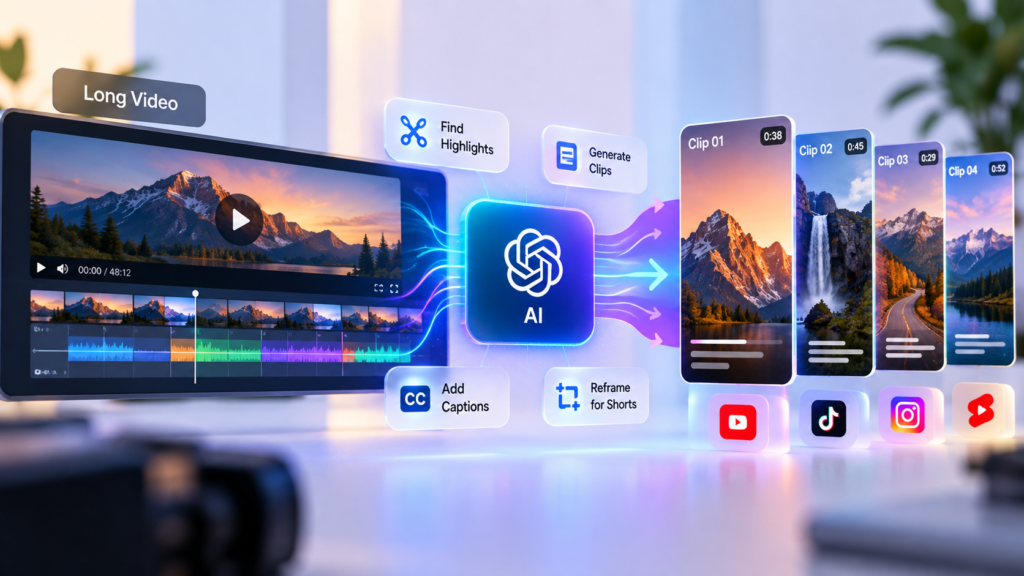
Creating short-form videos from long content used to mean watching an entire video, finding the best moments, cutting the footage manually, adding captions, resizing the video, and exporting several versions.
AI can now handle much of that process for you.
Whether you have a podcast, interview, webinar, tutorial, livestream, presentation, or YouTube video, AI-powered video tools can analyze the longer recording, identify potentially interesting moments, turn them into shorter clips, generate captions, and prepare them for platforms such as TikTok, Instagram Reels, YouTube Shorts, and other short-form channels.
That doesn’t mean you should simply upload a video and publish whatever the AI produces.
The best results usually come from combining AI-assisted editing with human judgment.
AI can help you find and prepare clips quickly. You still need to decide which moments are actually worth publishing.
In this guide, we’ll walk through how to turn a long video into short clips using AI, what the process looks like, what to look for in a good clip, and how to make the final videos feel less automated.
Why Turn Long Videos Into Short Clips?
Long-form content contains more usable material than you might realize.
A 30-minute interview, for example, could contain several useful explanations, surprising statements, stories, questions, or memorable moments.
Instead of creating one piece of content from that recording, you can turn it into multiple pieces.
A single long video might become:
- Several YouTube Shorts
- Instagram Reels
- TikTok videos
- LinkedIn clips
- Promotional snippets
- Educational clips
- Quote-based videos
- Teasers for the original video
This is often called content repurposing.
The idea is simple:
Create once, then find more ways to use the valuable parts of what you’ve already created.
AI makes this process faster by helping identify and prepare those pieces.
What AI Can Do With a Long Video
Depending on the tool you’re using, AI can assist with several parts of the editing process.
Find interesting moments
AI can analyze the transcript and identify sections that may work well as standalone clips.
It may look for things such as:
- Strong statements
- Questions and answers
- Stories
- Surprising moments
- Useful tips
- Emotional reactions
- Clear explanations
- Interesting opinions
- Moments that create curiosity
The quality of this selection varies, so you should still review the suggestions.
Create short clips
Some AI video editors can automatically select sections of a longer video and create shorter versions.
For example, a 45-minute interview might produce several suggested clips ranging from 30 seconds to a few minutes.
Generate captions
AI can automatically transcribe speech and turn it into on-screen captions.
This can save considerable editing time, especially when you’re producing several clips.
You should still check the captions carefully.
Names, technical terms, accents, and unusual words can sometimes be transcribed incorrectly.
Reframe the video
Long-form videos are often recorded horizontally, while many short-form platforms favour vertical video.
AI-assisted editors can automatically reframe the footage to a vertical format and attempt to keep the speaker in view.
This is particularly useful for interviews and talking-head videos.
Remove unnecessary sections
Some tools can detect pauses, filler words, silence, or other sections that may be worth trimming.
This can help make a clip more concise.
However, don’t remove every pause automatically.
Natural pauses can sometimes make a speaker sound more human, and aggressive editing can make a video feel rushed.
The Basic AI Video Repurposing Workflow
The process can be simplified into seven steps:
Long video → Transcript → AI clip suggestions → Select the best moments → Edit → Add captions and branding → Publish
Let’s look at each step.
Step 1: Start With a Good Long-Form Video
AI cannot turn weak source material into consistently strong content.
The quality of the original recording still matters.
Ideally, your long-form video should have:
- Clear audio
- Understandable speech
- Good lighting
- A stable image
- Useful information or entertainment
- A reasonably focused topic
The source doesn’t need to be perfect.
But if the audio is difficult to understand or the speaker spends most of the recording discussing unrelated topics, AI will have less useful material to work with.
Good source videos include:
- Podcasts
- Interviews
- Tutorials
- Webinars
- Educational videos
- Product demonstrations
- Livestreams
- Presentations
- Talking-head videos
- Video essays
If you already create long-form content, this is where the repurposing advantage becomes particularly useful.
Step 2: Upload the Video to an AI Video Tool
Choose an AI-powered video editor or repurposing tool that supports the type and length of video you’re working with.
The exact workflow will vary between platforms.
Some tools allow you to upload a complete video.
Others can work from a YouTube link, cloud storage, or another supported source.
After the video is processed, the system typically analyzes the audio and transcript before generating clip suggestions.
Before uploading anything, especially client or business material, check the platform’s privacy and data-handling policies.
Don’t assume that every uploaded video is treated in exactly the same way.
Step 3: Let AI Analyze the Content
This is where the AI does much of the initial work.
The system can analyze the transcript and identify sections that may work independently.
For example, imagine you recorded a one-hour conversation about starting a business.
The AI might identify moments such as:
“The biggest mistake I made when starting my first business…”
or:
“If I had to start again with only $500, this is what I’d do…”
Those statements contain a natural reason for someone to keep watching.
The AI may then create suggested clips around those sections.
But remember:
AI recommendations are suggestions, not final editorial decisions.
Step 4: Choose the Best Clips
This is the step where your judgment becomes especially important.
Don’t automatically publish every clip the AI generates.
Ask whether each clip works on its own.
A good short clip should usually have a clear reason for existing.
Look for a strong opening
The first few seconds matter.
A clip that begins with:
“So, today we’re going to talk about…”
may be technically fine but not particularly compelling.
A stronger opening might be:
“I lost my first $10,000 because I made this mistake.”
The second version immediately creates curiosity.
Look for one clear idea
A short clip shouldn’t try to explain an entire subject.
Choose one idea and make that idea the focus.
For example:
Weak:
Five different business lessons squeezed into 45 seconds.
Better:
One specific business mistake explained clearly in 35 seconds.
Look for a complete thought
The clip should make sense without requiring the viewer to watch the original video.
If someone watches the clip without any context, they should still understand what is being discussed.
This is one of the biggest differences between extracting a clip and creating a good short video.
Step 5: Edit the Clip
Once you’ve selected a promising section, review the edit manually.
You may want to:
- Remove unnecessary pauses
- Tighten the beginning
- Remove repetitive statements
- Correct awkward cuts
- Adjust the framing
- Add supporting visuals
- Improve the audio
- Add captions
- Add branding where appropriate
AI can speed up these tasks, but you don’t have to accept every automatic edit.
The goal is not to make the video look “AI-generated.”
The goal is to make the editing process faster while keeping the content natural.
Step 6: Format the Video for Short-Form Platforms
For most short-form content, a vertical format is the obvious starting point.
A common format is:
9:16 vertical video
This works well for platforms such as:
- YouTube Shorts
- TikTok
- Instagram Reels
If your original video was recorded horizontally, the AI editor may automatically reframe it.
Check the result carefully.
Make sure:
- The speaker’s face isn’t cropped incorrectly.
- Important objects remain visible.
- Text isn’t cut off.
- The composition feels natural.
- There is enough space for captions and interface elements.
Automatic reframing can save time, but it isn’t always perfect.
Step 7: Add Captions
Captions have become a standard part of short-form video.
AI can generate them automatically, which makes the process much faster.
But don’t simply export the first version.
Read through the captions.
Check:
- Names
- Numbers
- Technical terms
- Brand names
- Spelling
- Punctuation
- Timing
You should also avoid making the captions so large or visually complicated that they cover the speaker’s face.
Good captions should improve comprehension, not become the main attraction.
How to Make AI-Generated Clips Feel Human
One of the biggest risks of automated video repurposing is producing clips that technically work but feel generic.
You can reduce this by making a few manual decisions.
Keep the speaker’s natural personality
Don’t remove every pause or imperfect moment.
A little natural hesitation can make someone feel more authentic.
Avoid excessive effects
You don’t need animated text, transitions, zooms, sound effects, and graphics appearing every few seconds.
Use effects when they help the viewer understand or stay engaged.
Keep the editing consistent
If you’re producing multiple clips from the same show or channel, develop a recognizable visual style.
That could include:
- A consistent caption style
- Similar typography
- A recurring intro or visual treatment
- Consistent positioning of your logo
- A consistent colour palette
The goal is to make the clips feel like they belong to the same brand.
What Makes a Good Short Clip?
AI can identify potentially interesting moments, but you should understand what makes a clip worth watching.
A strong short video often has several of these characteristics:
A clear hook
The viewer immediately understands why they should keep watching.
A specific idea
The clip focuses on one useful, entertaining, surprising, or interesting point.
Good pacing
There isn’t unnecessary dead space.
A payoff
The viewer gets something from watching the clip.
That could be:
- An answer
- A useful tip
- A surprising fact
- A story
- A lesson
- A strong opinion
- A satisfying conclusion
A natural ending
The clip doesn’t feel like it suddenly stops halfway through a sentence.
A simple conclusion can be enough.
You can also use a call to action when it makes sense:
“Watch the full conversation for the complete story.”
But don’t force a call to action into every video.
How Long Should Your Short Clips Be?
There isn’t one perfect length for every short video.
The right length depends on the content.
A simple explanation might work in 20–30 seconds.
A useful story might need 45–60 seconds.
A more detailed explanation may need longer.
The goal shouldn’t be:
Make every video exactly 30 seconds.
Instead:
Make the clip as short as possible without removing the information that makes it valuable.
If a strong idea takes 52 seconds to explain properly, cutting it to 20 seconds just to make it shorter can make the content worse.
Should You Add a Hook Yourself?
Sometimes the AI-selected clip starts in the middle of the conversation.
For example:
“And that’s why I decided to leave the company.”
The statement might be interesting, but the viewer doesn’t know what “that’s” refers to.
You could add a short contextual introduction:
“Why did he leave a six-figure job?”
Then move into the original clip.
This can make the video easier to understand without changing what the speaker actually said.
However, don’t create misleading hooks that imply something the speaker didn’t mean.
The hook should accurately represent the content that follows.
A Practical Example
Imagine you have a 60-minute podcast episode about starting an online business.
You upload the episode to an AI video editor.
The system identifies 12 potential clips.
You review them and select five.
Clip 1
Topic: The biggest mistake the guest made.
Length: 42 seconds.
Clip 2
Topic: How the guest found their first customer.
Length: 55 seconds.
Clip 3
Topic: A common mistake beginners make.
Length: 31 seconds.
Clip 4
Topic: How much money was needed to start.
Length: 48 seconds.
Clip 5
Topic: Advice for someone starting today.
Length: 60 seconds.
You then:
- Review each clip.
- Tighten unnecessary sections.
- Check the AI-generated captions.
- Reframe each video vertically.
- Apply your visual style.
- Add a simple call to action where appropriate.
- Export the clips.
- Schedule them across your platforms.
One 60-minute recording has now become several pieces of short-form content.
That’s the real value of AI-assisted video repurposing.
AI Tools You Can Use
There are several categories of tools that can help with this workflow.
AI clip generators
These tools are designed specifically to identify highlights from longer videos and turn them into short clips.
They are useful when your priority is speed and automated clip discovery.
AI video editors
These provide broader editing capabilities alongside AI features.
They may help with:
- Transcription
- Captions
- Cutting
- Reframing
- Audio cleanup
- Background removal
- Visual editing
They are useful when you want more control over the final video.
General-purpose video editors with AI features
Some mainstream video editing platforms now include AI-assisted features rather than focusing exclusively on automatic clipping.
These can be useful if you want to combine automation with traditional editing controls.
The best choice depends on your workflow, budget, video type, and how much control you want over the final result.
Don’t Let AI Choose Everything
There is a temptation to upload a long video, click “generate clips,” download the results, and publish them all.
That’s convenient.
It’s also where quality can suffer.
AI doesn’t understand your audience exactly the way you do.
It may identify a sentence as interesting because it contains a strong phrase, while missing the larger context that makes the statement useful.
It may also select a technically complete section that simply isn’t interesting enough to hold attention.
That’s why a strong workflow looks more like:
AI finds possibilities → You choose → AI helps edit → You review → You publish
rather than:
AI does everything → Publish
A Simple Workflow for Beginners
If you’re completely new to AI video editing, don’t overcomplicate the process.
Start with this:
Step 1
Choose one long video that already contains useful content.
Step 2
Upload it to an AI-powered video editing or clipping tool.
Step 3
Let the AI generate potential clips.
Step 4
Watch every suggested clip before publishing.
Step 5
Keep only the clips that make sense independently.
Step 6
Correct captions and awkward cuts.
Step 7
Reframe the video for vertical viewing.
Step 8
Add your normal branding.
Step 9
Write a platform-appropriate caption.
Step 10
Publish and observe which types of clips perform best.
After several videos, you’ll start to recognize which topics, hooks, and formats work best for your audience.
Common Mistakes to Avoid
Publishing every AI-generated clip
More clips don’t necessarily mean better content.
Choosing clips without context
A quote can sound interesting but become misleading when removed from the original conversation.
Over-editing
Too many effects can distract from the actual content.
Ignoring captions
Automatic transcription isn’t perfect.
Making every clip the same length
Different ideas require different amounts of time.
Forgetting the original content
Short clips can help people discover your long-form content. When appropriate, make it easy for viewers to find the full episode or original video.
Uploading private or sensitive material without checking the tool’s policies
Always understand how a platform handles uploaded videos, particularly when the footage contains confidential business information, clients, private conversations, or unreleased material.
The Bigger Opportunity: Build a Content System
The real advantage of AI video clipping isn’t simply saving a few minutes in an editing timeline.
It can help you build a repeatable content system.
For example:
One podcast → 5 short clips → 5 social posts → 1 newsletter idea → 1 blog topic
Or:
One tutorial → 4 Shorts → 4 social posts → FAQ content → supporting article
This changes the way you think about content creation.
Instead of constantly asking:
“What should I create next?”
you can ask:
“How can I get more useful content from what I’ve already created?”
AI makes that process easier.
Final Thoughts
Turning a long video into short clips no longer has to mean spending hours searching through a timeline.
AI can help identify interesting moments, generate transcripts, create captions, reframe footage, remove unnecessary sections, and prepare clips for short-form platforms.
But the best results still come from combining automation with human judgment.
Use AI to handle the repetitive parts.
You decide which moments are worth sharing.
You decide whether a clip makes sense without its original context.
You decide whether the editing fits your brand.
And you decide what is ultimately worth publishing.
The goal isn’t to create as many clips as possible.
It’s to turn the valuable parts of your long-form content into short videos that people actually want to watch.
Once you develop a reliable workflow, one long video can become the starting point for an entire collection of content.