
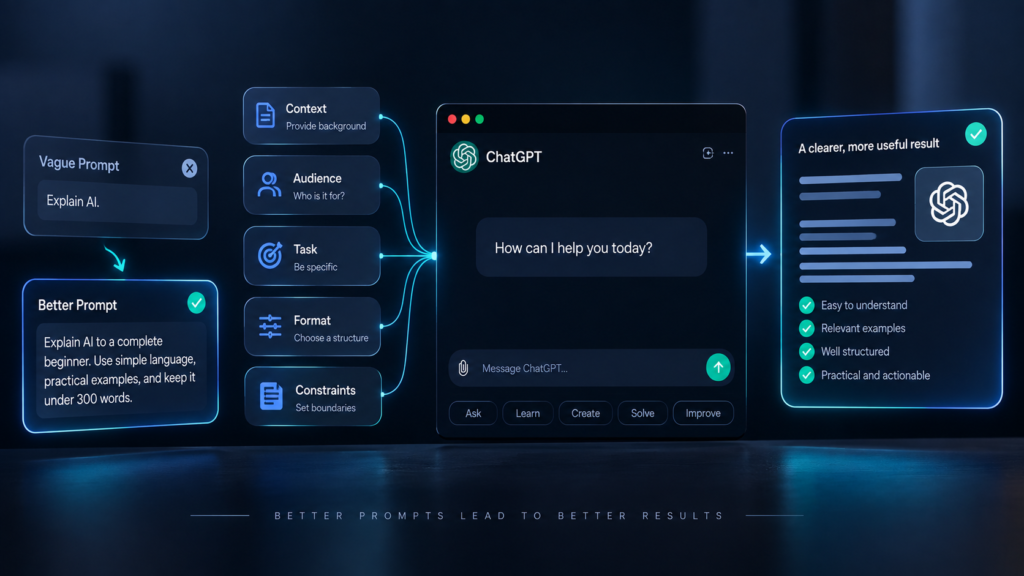
ChatGPT can write, explain, summarize, brainstorm, analyze, and help you work through problems. But getting useful results from it isn’t simply about knowing what to type.
Two people can give ChatGPT a similar request and receive completely different results.
One might get a vague, generic answer.
The other might get something specific, useful, and ready to work with.
The difference often comes down to how the task is communicated.
You don’t need to become an AI expert to use ChatGPT effectively. You just need to understand a few basic principles: give the right context, explain what you want, provide useful constraints, and be willing to refine the result.
This guide walks through the practical basics of using ChatGPT more effectively, especially if you’re just getting started.
What Is ChatGPT?
ChatGPT is an AI assistant that can understand natural-language instructions and generate responses based on what you provide.
You can use it for tasks such as:
- Answering questions
- Explaining difficult topics
- Writing and rewriting
- Brainstorming ideas
- Summarizing information
- Analyzing text
- Planning projects
- Learning new skills
- Generating and reviewing code
- Organizing information
- Working through problems
Exactly what ChatGPT can do depends on the version and features available to you, but the basic interaction remains simple:
You describe what you need → ChatGPT responds → you refine the result if necessary.
The important part is that ChatGPT isn’t a mind reader.
The quality of the information you provide has a major effect on the usefulness of the response.
The Biggest Mistake Beginners Make
One of the most common mistakes is asking ChatGPT to do something without providing enough context.
For example:
“Write an article about AI.”
That’s a request, but it leaves many important questions unanswered.
Who is the article for?
How long should it be?
What is the purpose?
What tone should it use?
Should it be educational, persuasive, technical, or conversational?
Should it target a particular search keyword?
Where will it be published?
Compare that with:
“Write a 1,500-word beginner-friendly article about AI agents for a global technology website. Explain what AI agents are, how they differ from chatbots, practical examples, their limitations, and what ordinary users should know before using them. Use clear language and avoid unnecessary technical jargon.”
The second instruction gives ChatGPT a much clearer target.
This leads to one of the most useful principles for working with AI:
Don’t just tell ChatGPT what to do. Give it enough context to understand what a good result looks like.
Start With the Outcome You Want
Before writing your prompt, think about the actual result you need.
Instead of asking:
“Tell me about email marketing.”
Ask:
“I’m a freelancer trying to get more clients through email. Explain the basics of email marketing and give me a simple strategy I can start with this month.”
The second request gives the AI a purpose.
This is especially useful when you don’t know much about the subject yourself.
You don’t necessarily need to know the technical terminology.
You can simply describe:
- What you’re trying to accomplish
- What you already know
- What you’re struggling with
- What you want the final result to look like
ChatGPT can then help you work from there.
Give ChatGPT Context
Context tells ChatGPT what situation it is working within.
For example, suppose you want help writing a message to a client.
Instead of:
“Write a message to my client.”
You could say:
“I’m a freelance graphic designer. A client asked for three revisions, but the original agreement included only two. I want to explain this politely without sounding confrontational. Write a short WhatsApp message that explains the situation and suggests that the additional revision may require an extra fee.”
Now ChatGPT knows:
- Your role
- Who you’re communicating with
- What happened
- What problem needs to be solved
- What tone you want
- Where the message will be used
That context makes a significant difference.
A simple formula
When you’re unsure what information to include, try:
Context + Task + Desired result
For example:
Context: I’m preparing a presentation for a small business audience.
Task: Explain how AI agents can help with repetitive administrative work.
Desired result: Give me five practical examples using simple language.
You don’t need to follow this formula rigidly, but it is a useful starting point.
Be Specific About What You Want
Vague instructions often produce vague results.
Compare:
“Make this better.”
with:
“Rewrite this paragraph so it sounds more professional and concise. Keep the original meaning and reduce it to about 80 words.”
The second instruction gives ChatGPT something measurable to work toward.
You can specify:
- Length
- Tone
- Audience
- Format
- Number of examples
- Reading level
- Structure
- Things to include
- Things to avoid
For example:
“Give me 10 YouTube video ideas for beginners. Keep each idea under 15 words and make them practical rather than news-focused.”
That’s much easier for an AI system to follow than:
“Give me some YouTube ideas.”
Tell ChatGPT Who the Audience Is
The same information can be explained very differently depending on who will read it.
Consider the topic of artificial intelligence.
A developer might want technical terminology and implementation details.
A small business owner might want practical examples.
A complete beginner might need simple explanations and definitions.
So instead of:
“Explain APIs.”
Try:
“Explain APIs to someone who has never written code. Use a restaurant analogy and then give two everyday examples.”
The audience changes the answer.
Whenever you’re asking ChatGPT to create something for someone else, tell it who that person is.
Give It a Role When It Helps
You can also tell ChatGPT what perspective you want it to use.
For example:
“Act as a career coach helping a recent graduate prepare for a job interview.”
Or:
“Act as a technical editor reviewing this article for clarity and accuracy.”
Or:
“Act as a marketing strategist helping a small online business improve its landing page.”
This can help establish the perspective and priorities you want.
However, don’t assume that saying “act as an expert” automatically makes the response accurate.
A role helps shape the response. It doesn’t guarantee expertise or correctness.
For factual or high-stakes subjects, you should still verify important information.
Use Examples to Show What You Mean
Sometimes the best way to explain what you want is to show ChatGPT an example.
Suppose you want a series of social media captions with a particular style.
You could say:
“Here are three examples of captions I like: [examples]. Write five new captions with a similar level of brevity and energy, but don’t copy their wording.”
Examples give the model a concrete reference point.
This is particularly useful for:
- Writing style
- Formatting
- Tone
- Brand voice
- Data classification
- Repeated content
- Templates
Instead of spending several paragraphs describing a style, sometimes one or two good examples can communicate it more effectively.
Tell It What Not to Do
Good instructions aren’t only about what you want.
Sometimes you also need to specify what you don’t want.
For example:
“Write a professional LinkedIn post about this topic. Keep it conversational. Don’t use emojis, exaggerated claims, or phrases such as ‘game changer’ and ‘revolutionary’.”
This gives ChatGPT boundaries.
You can also say:
- Don’t invent statistics.
- Don’t change the meaning.
- Don’t use technical jargon.
- Don’t repeat the same point.
- Don’t make the introduction too long.
- Don’t use a sales-heavy tone.
- Don’t include information that isn’t supported by the provided material.
These constraints can make the result much more useful.
Don’t Expect the First Response to Be Perfect
One of the most important things for beginners to understand is that using ChatGPT is often iterative.
You don’t necessarily need to create one perfect prompt and get a perfect answer immediately.
Think of the conversation as a working session.
You might start with:
“Help me plan a YouTube video about AI tools.”
ChatGPT gives you an outline.
You can then say:
“Make the introduction more interesting and less generic.”
Then:
“The audience is complete beginners. Simplify the technical section.”
Then:
“Now turn the outline into a 7-minute script.”
Then:
“Make the script sound more natural when spoken aloud.”
Each instruction builds on the previous one.
This is one of the biggest advantages of conversational AI.
You can refine the result instead of starting over every time.
Ask ChatGPT to Improve Its Own Work
You can also ask ChatGPT to review a response before you use it.
For example:
“Review this article for repetition, unclear explanations, and unsupported claims. List the issues first, then suggest specific improvements.”
Or:
“Critique this proposal from the perspective of a potential client. Identify anything that could make the proposal unclear or unconvincing.”
Or:
“Check this email for grammar, tone, and clarity. Don’t rewrite it yet. First explain what needs improvement.”
This creates a useful two-step process:
Create → Review → Improve
You can use the same approach for writing, planning, research, presentations, and many other tasks.
Break Large Tasks Into Smaller Steps
ChatGPT can handle complicated requests, but large tasks can become easier to manage when you break them into stages.
Suppose you want to create a complete YouTube video.
Instead of immediately asking:
“Write a complete YouTube video about starting a business.”
You could work through:
- Identify the target audience.
- Define the video’s objective.
- Generate possible angles.
- Choose the strongest angle.
- Create an outline.
- Write the introduction.
- Write the main sections.
- Add examples.
- Create the conclusion.
- Review the complete script.
This approach gives you more control over the final result.
It also makes it easier to catch problems early.
Use ChatGPT as a Thinking Partner
ChatGPT isn’t only useful when you already know exactly what you want.
You can also use it when you’re trying to figure something out.
For example:
“I want to start a small online business, but I’m unsure whether to sell a service or a digital product. Ask me 10 questions one at a time to help me evaluate the options.”
Or:
“I have these three business ideas. Help me identify the assumptions behind each one and the questions I should answer before choosing.”
This changes the role of ChatGPT.
Instead of simply asking it for an answer, you’re using it to structure your thinking.
That can be particularly useful when the problem doesn’t have one obvious solution.
Ask for Different Perspectives
When you’re making a decision, you can ask ChatGPT to examine the issue from multiple perspectives.
For example:
“I’m considering launching this service. Give me the strongest arguments for the idea, the strongest arguments against it, the biggest risks, and what information I should gather before deciding.”
This is more useful than simply asking:
“Is this a good idea?”
The second question invites a simple verdict.
The first asks for an analysis.
That distinction matters.
You should still make the final decision yourself, particularly when the decision involves money, health, legal matters, employment, or other significant consequences.
Use Follow-Up Questions
You don’t have to repeat your entire original request every time.
If ChatGPT gives you an explanation you don’t understand, ask:
“Explain the second point more simply.”
If the answer is too long:
“Reduce this to five key points.”
If you want examples:
“Give me three real-world examples.”
If the explanation is too technical:
“Explain this as if I’m completely new to the subject.”
If something seems questionable:
“Which parts of this answer should I verify?”
A conversation can become progressively more useful as you identify what you need next.
Ask for a Specific Format
If you know how you want the answer organized, say so.
For example:
“Compare these three options in a table with columns for cost, difficulty, advantages, disadvantages, and ideal use case.”
Or:
“Give me a step-by-step checklist.”
Or:
“Summarize this in five bullet points followed by a short explanation.”
Or:
“Turn these notes into a professional email.”
The more specific the desired format, the less work you’ll need to do afterward.
Give It Your Source Material
When you’re asking ChatGPT to work with specific information, provide the information whenever possible.
For example, if you want it to summarize a document, give it the document rather than asking it to guess what the document contains.
If you’re rewriting something, provide the original text.
If you’re analyzing a proposal, provide the actual proposal.
If you’re asking for feedback on a piece of writing, give ChatGPT the complete section you want reviewed.
This reduces assumptions and makes the response more closely tied to your actual material.
Ask It to Identify Uncertainty
One useful habit is to ask ChatGPT to distinguish between what is known and what is uncertain.
For example:
“Separate the confirmed facts from assumptions in your answer.”
Or:
“If you aren’t sure about something, say so rather than guessing.”
This can be particularly useful when dealing with technical, financial, legal, scientific, or current information.
AI systems can produce confident-sounding responses even when an answer contains errors.
A clear request for uncertainty doesn’t eliminate mistakes, but it encourages a more careful interaction.
Don’t Treat ChatGPT as an Automatic Source of Truth
This is one of the most important lessons for beginners.
ChatGPT can be extremely useful, but it can still make mistakes.
It may:
- Misunderstand your question
- Produce outdated information
- Make incorrect calculations
- Invent details
- Misinterpret a document
- Present an assumption as a fact
- Miss important context
For low-stakes tasks, a small mistake may not matter much.
For important decisions, it can matter a lot.
If the information affects your money, health, legal situation, business, education, or safety, verify important claims using appropriate authoritative sources.
Think of ChatGPT as a tool that helps you work with information, not as a replacement for judgment.
Use ChatGPT for First Drafts, Not Just Final Answers
One of the easiest ways to get value from ChatGPT is to use it at the beginning of a project.
Instead of waiting until you have everything figured out, ask it to help you create a starting point.
For example:
“I need to write a proposal for a small business website. Give me a basic structure.”
Then improve it.
Or:
“I want to learn video editing. Create a four-week beginner learning plan.”
Then adjust the plan based on your available time.
Or:
“I have these rough notes. Organize them into a logical outline.”
The first response doesn’t have to be the final result.
It can simply give you something useful to work from.
Build Reusable Prompts
If you perform the same task regularly, don’t rewrite the entire instruction every time.
Create a reusable prompt or template.
For example:
“You are helping me create weekly technology articles for a global audience. The article should be clear, practical, and beginner-friendly. Avoid unnecessary jargon and unsupported claims. Use short paragraphs, descriptive headings, and practical examples. Here is this week’s topic: [TOPIC].”
You can then change only the topic.
Reusable prompts are particularly useful for:
- Weekly reports
- Content creation
- Customer messages
- Meeting summaries
- Research
- Project planning
- Social media content
- Data analysis
- Learning exercises
Over time, this can turn ChatGPT from something you occasionally ask questions to into a more consistent part of your workflow.
A Simple Prompt Formula for Beginners
If you’re not sure what to write, use this structure:
1. Context
Explain the situation.
2. Task
Tell ChatGPT what you want it to do.
3. Audience
Explain who the result is for.
4. Constraints
Specify limitations such as length, tone, format, or things to avoid.
5. Desired output
Explain what the final result should look like.
For example:
Context: I’m creating a beginner technology blog.
Task: Write an article explaining password managers.
Audience: People with little technical knowledge.
Constraints: Use simple language, avoid fear-based messaging, and keep the article practical.
Desired output: A structured article with an introduction, clear headings, examples, practical advice, and FAQs.
You don’t have to use these labels every time.
The point is to give ChatGPT enough information to understand the assignment.
Examples of Better ChatGPT Prompts
Here are some simple examples you can adapt.
Instead of:
“Write a CV.”
Try:
“I’m applying for an entry-level customer support role. Here is my current work history and education. Create a one-page CV that highlights communication, problem-solving, and customer service experience. Keep the language professional and avoid exaggerating my experience.”
Instead of:
“Help me study.”
Try:
“I have an exam in two weeks and can study for one hour each evening. I need to learn these five topics: [topics]. Create a 14-day study plan with daily objectives, revision sessions, and short self-tests.”
Instead of:
“Make this professional.”
Try:
“Rewrite this message so it sounds professional and respectful. Keep the meaning unchanged, remove unnecessary words, and make it suitable for sending to a client.”
Instead of:
“Give me business ideas.”
Try:
“Give me 10 online business ideas that can be started by one person with a limited budget. Prioritize ideas that can generate revenue from services rather than physical products. For each idea, explain the target customer, how it makes money, and the main challenge.”
Instead of:
“Explain this.”
Try:
“Explain this concept to someone who has never studied it. Start with a simple definition, use an everyday analogy, then give a practical example.”
The goal isn’t to make your prompts complicated.
It’s to make them clear.
Common ChatGPT Mistakes to Avoid
Asking vague questions
If the question is unclear, the answer may be equally unclear.
Giving too little context
The AI has less information to work with and may make assumptions.
Expecting perfection on the first attempt
Useful results often come through iteration.
Accepting every answer without checking
AI-generated information can contain errors.
Asking for too many unrelated things at once
Large, unfocused requests can make it harder to get a coherent result.
Giving unnecessary information
More context isn’t always better. Give ChatGPT information that actually affects the task.
Relying on ChatGPT for important decisions without verification
AI can support your thinking, but it shouldn’t replace appropriate professional or authoritative sources when the stakes are high.
The Best Way to Think About ChatGPT
The most useful mental model may be this:
ChatGPT is not a vending machine for perfect answers. It’s a tool you can work with.
You provide information.
It produces a response.
You evaluate that response.
You clarify what needs to change.
It produces another version.
You repeat the process until the result is useful.
That makes the quality of your interaction depend less on finding a magical prompt and more on learning how to communicate clearly with the system.