
AI has become remarkably good at answering questions.
You can ask an AI chatbot to explain a topic, write an email, summarize a document, generate ideas, or help you solve a problem. But AI is increasingly moving beyond simply responding to prompts.
The next step is AI that can take action.
That’s where AI agents come in.
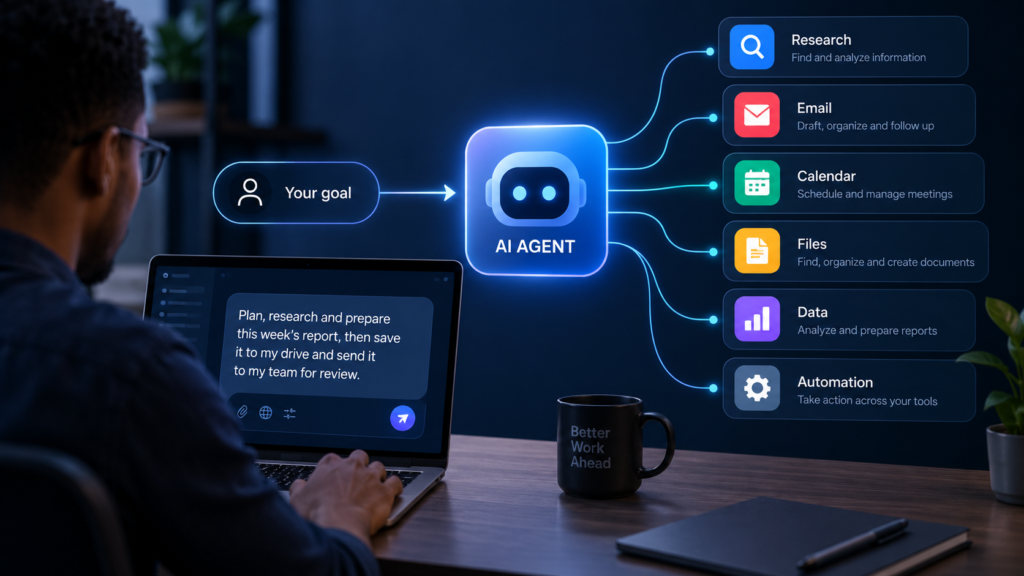
Instead of stopping after generating a response, an AI agent can work toward a goal, break a task into multiple steps, use connected tools, make decisions along the way, and carry out actions on your behalf.
For example, instead of asking an AI to tell you how to organize your weekly sales report, you could potentially give an AI agent access to the approved data and ask it to gather the numbers, analyze them, create a summary, and prepare the report.
The important distinction is simple:
A chatbot mainly talks to you. An AI agent can work on a task for you.
That doesn’t mean AI agents are independent digital employees that can safely do anything without supervision. Their capabilities depend on the AI model behind them, the tools they can access, the instructions they receive, and the permissions they have.
So what exactly is an AI agent? How is it different from a chatbot? And where does it actually make sense to use one?
Let’s break it down.
What Is an AI Agent?
An AI agent is a software system that uses artificial intelligence to pursue a defined goal, make decisions, use tools, and take actions with some degree of autonomy.
A traditional AI chatbot primarily responds to what you ask. An AI agent can go a step further by determining what needs to happen next and using available tools to accomplish a larger objective.
A typical agent may be able to:
- Understand a goal
- Break the goal into smaller tasks
- Decide what action to take next
- Use external tools or applications
- Retrieve information
- Process that information
- Take actions
- Check the results
- Continue working when additional steps are required
The exact capabilities vary from one agent to another.
Some agents may only perform a few predefined actions. Others can work across several applications and complete much more complicated workflows.
The easiest way to understand the difference is to compare asking for information with delegating a task.
Imagine you need to prepare a weekly business report.
A chatbot could help you write the report if you provide the relevant information.
An AI agent could potentially:
- Access approved data sources.
- Collect the latest figures.
- Compare them with previous results.
- Identify important changes.
- Create a summary.
- Prepare the report.
- Save it to a specified folder.
- Send it for your review.
The agent isn’t simply generating one long response. It is coordinating multiple steps to accomplish a goal.
That’s what makes agentic AI different.
How Do AI Agents Work?
There isn’t one universal architecture for AI agents. Different products use different AI models, tools, memory systems, and methods for coordinating tasks.
However, most useful AI agents involve several important components.
An AI model
At the centre of an AI agent is usually an AI model, often a large language model (LLM).
The model interprets instructions, reasons about the task, and helps determine what should happen next.
However, the AI model itself isn’t necessarily the entire agent.
Think of the model as the reasoning engine inside a larger system.
A goal
An agent needs an objective.
For example:
“Prepare a weekly summary of our sales performance.”
That’s different from asking:
“What were our sales this week?”
The first describes an outcome. The second primarily asks for information.
Agents are particularly useful when the desired result requires several actions.
Tools
Tools are one of the most important parts of an AI agent.
An agent can be connected to external tools that allow it to interact with software and information sources.
Depending on the system, these could include:
- Web search
- Calendars
- Spreadsheets
- Databases
- Cloud storage
- Customer relationship management (CRM) systems
- Project management platforms
- Code execution environments
- Business applications
- APIs
Without tools, an agent may be limited to reasoning and generating information.
With tools, it can potentially take action.
Memory and context
Some agents can retain information about the task they are working on or retrieve relevant information from connected data sources.
For example, an agent working on a project might need access to previous project notes, documents, deadlines, and decisions.
Memory can make agents more useful, but it also introduces privacy considerations.
The more information an agent can access, the more important it becomes to control what it is allowed to see and use.
An execution system
An agent also needs a way to turn decisions into actions.
Consider a simple scheduling task.
The goal might be:
“Find a suitable time for a meeting next week.”
The agent could:
- Check the relevant calendars.
- Find available time slots.
- Compare those options against the user’s preferences.
- Select a suitable time.
- Create the calendar event.
- Send invitations.
The AI model helps determine what should happen. The connected tools make those actions possible.
AI Agents vs. Chatbots: What’s the Difference?
The terms “AI agent” and “AI chatbot” are sometimes used interchangeably, but they aren’t exactly the same thing.
A chatbot is primarily designed for conversation.
An AI agent is designed to accomplish a task or goal.
Modern AI products can blur this distinction. A chatbot can have tools and perform actions, while an AI agent can communicate through a chat interface.
So the most useful question isn’t simply whether you can chat with the system.
Ask:
What happens after you send the message?
| Capability | Chatbot | AI agent |
|---|---|---|
| Answer questions | Yes | Yes |
| Generate text | Yes | Yes |
| Hold a conversation | Yes | Usually |
| Use external tools | Sometimes | Often |
| Break goals into multiple steps | Limited | Core capability |
| Execute actions | Limited or none | Often |
| Work across applications | Usually limited | Often |
| Adapt during a task | Limited | More capable |
| Complete an end-to-end workflow | Limited | Core use case |
A chatbot might tell you how to perform a task.
An agent may be able to perform the task.
The distinction isn’t absolute, but it is useful when deciding what kind of AI system you actually need.
What Can AI Agents Actually Do?
The possibilities depend on the tools, information, and permissions connected to the agent.
An agent without access to external systems is relatively limited.
An agent connected to your email, files, calendar, business software, or other services can potentially handle much more complicated workflows.
Here are some practical examples.
Research and information gathering
Research can involve a lot of repetitive work.
An AI agent could potentially:
- Search approved sources.
- Open relevant pages or documents.
- Extract important information.
- Compare findings.
- Organize the results.
- Prepare a summary.
This could be useful for market research, competitor research, product comparisons, industry research, and other information-heavy tasks.
However, research still needs verification.
An agent can misunderstand a source, miss important context, or treat unreliable information as accurate. For important work, you should still check the underlying sources.
Email management
An email agent could potentially:
- Categorize incoming messages
- Identify emails requiring attention
- Summarize long conversations
- Draft responses
- Extract action items
- Create follow-up reminders
- Route certain requests to the appropriate person
With the right permissions, some systems can also take actions automatically.
But there’s an important difference between drafting an email and sending one.
A draft can be reviewed before it goes out.
An automatically sent message may create a problem before you have a chance to catch an error.
Calendar and scheduling
Scheduling is another natural use case for agents.
An agent could check calendars, identify available times, account for specified preferences, create meetings, and send invitations.
Instead of manually coordinating several steps, you could give the agent a goal and let it handle the routine coordination.
File and document management
An agent with controlled access to your files could potentially:
- Find documents
- Organize files
- Extract information
- Compare documents
- Summarize reports
- Create new documents
- Move files into designated folders
This can be particularly useful for repetitive administrative work.
But file permissions matter.
Giving an agent unrestricted access to an entire cloud drive simply because it makes a workflow easier can create unnecessary security and privacy risks.
Customer support
AI agents can also work behind customer service systems.
Suppose a customer asks about an order.
An agent could potentially:
- Identify the customer.
- Retrieve the order.
- Check its status.
- Determine whether the request qualifies for a particular action.
- Update the relevant system.
- Respond to the customer.
At that point, the agent isn’t merely generating a response. It is interacting with business systems to help resolve the request.
Software development
Software development is another area where agentic AI can be useful.
A coding agent may be able to:
- Inspect a codebase
- Understand a development task
- Modify files
- Run tests
- Identify errors
- Make additional changes
- Repeat the process
- Prepare changes for human review
This doesn’t remove the need for developers.
Someone still needs to define the requirements, review the changes, understand the system, test the result, and decide whether the changes should be deployed.
What Does an AI Agent Workflow Look Like?
The easiest way to understand AI agents is through a real workflow.
Imagine you run an online business and want a weekly competitor report.
The traditional approach
You might:
- Search for competitors.
- Visit their websites.
- Check their latest products.
- Record prices.
- Look for announcements.
- Add information to a spreadsheet.
- Write a summary.
You are manually coordinating every step.
The agentic approach
You could give a properly configured agent a goal such as:
“Prepare this week’s competitor report using the approved sources and save the completed report to the marketing folder.”
The agent could then work through something like:
Plan → Search → Extract → Compare → Organize → Draft → Save
You could then review the finished report before it is shared.
The important change is that you’re no longer micromanaging every individual step.
You’re delegating the workflow.
Where Are AI Agents Most Useful?
AI agents aren’t automatically useful just because they are more autonomous.
They tend to make the most sense when a task has several characteristics.
The task is repetitive
If you perform the same sequence of tasks every week, an agent may be able to reduce the amount of manual work.
The task is multi-step
Agents become more useful when completing a task requires several connected actions.
The task is digital
Agents work particularly well when the work happens inside software systems.
The task follows clear rules
Agents need boundaries.
For example:
“Find customer support emails, categorize them, and draft responses, but don’t send anything without approval.”
That’s a much clearer workflow than:
“Handle my inbox.”
The task is time-consuming but relatively predictable
An agent can be useful for work that takes a lot of time but doesn’t require constant human judgment.
Examples include administrative processing, research preparation, document organization, data preparation, and routine reporting.
Where Should Humans Stay Involved?
This is one of the most important things to understand about AI agents.
More autonomy does not automatically mean better results.
The consequences of an incorrect action matter.
If an agent makes a mistake while organizing a folder, the problem may be relatively easy to fix.
If an agent sends incorrect financial instructions, deletes important information, publishes inaccurate information, or changes an important business record, the consequences can be much more serious.
A useful principle is:
The more consequential the action, the stronger the human checkpoint should be.
For example:
| Task | Suggested oversight |
|---|---|
| Summarizing documents | Light review |
| Organizing files | Periodic review |
| Drafting emails | Human approval |
| Sending routine messages | Rules and monitoring |
| Editing business records | Strong controls |
| Financial transactions | Human approval |
| Legal or compliance decisions | Human judgment |
| High-impact decisions | Human decision-maker |
The exact level of oversight depends on the situation.
A good general rule is to let AI handle more of the execution when mistakes are cheap and reversible, while keeping humans closely involved when mistakes are costly, irreversible, or difficult to detect.
The Risks and Limitations of AI Agents
AI agents introduce many of the same problems associated with generative AI, but their ability to take action can make those problems more consequential.
AI agents can make mistakes
An agent can misunderstand an instruction, misinterpret information, select the wrong tool, or produce an incorrect result.
The problem becomes more serious when the agent is allowed to act on its mistake.
A chatbot that gives you an incorrect answer is one problem.
An agent that makes an incorrect assumption and then takes several additional actions based on it can create a much larger problem.
Agents can hallucinate
AI models can generate information that sounds plausible but is incorrect.
An agent can carry those errors into a workflow.
That’s why important outputs should still be verified.
Prompt injection is a security concern
Agents that browse websites, read documents, process emails, or interact with external content can encounter instructions embedded within that content.
A malicious webpage or document could attempt to manipulate an agent into performing an action it was not supposed to perform.
This is one reason agent security requires more than simply protecting the AI model itself.
The agent’s tools, permissions, data sources, and execution environment also need to be protected.
Excessive permissions create unnecessary risk
An agent needs enough access to accomplish its job.
It doesn’t necessarily need access to everything.
For example, an agent that prepares a report may need to read a specific spreadsheet. It probably doesn’t need permission to delete files, send emails, access your financial accounts, and modify unrelated business records.
The principle of least privilege is important here:
Give an agent only the permissions it needs to perform its assigned task.
Agents can be difficult to monitor
When a task involves many steps, understanding exactly why something went wrong can become difficult.
As a result, more sophisticated agent deployments need appropriate logging, monitoring, permissions, and accountability.
The more an agent can do, the more important it becomes to understand what it did.
Agents can behave unpredictably
Even when an agent has been designed for a specific workflow, its behaviour can vary depending on the information it encounters and the decisions it makes along the way.
That doesn’t mean every AI agent will behave unpredictably.
It means users should evaluate an agent based on its actual reliability, permissions, safeguards, and failure modes rather than assuming that greater autonomy automatically means greater trustworthiness.
What Should Ordinary Users Know Before Using AI Agents?
You don’t need to be an AI engineer to use an AI agent responsibly.
But you should understand what you’re giving it permission to do.
Before connecting an agent to your accounts or files, ask these questions.
What exactly can it access?
Check whether the agent can access:
- Documents
- Calendar
- Contacts
- Financial information
- Business systems
- Browser sessions
- Cloud storage
Don’t assume that because an agent can access something, it needs to.
What can it actually change?
Reading information and changing information are very different permissions.
An agent that can read a spreadsheet is one thing.
An agent that can edit, delete, or share that spreadsheet is another.
Does it need approval before acting?
Look for settings that allow you to approve important actions before they happen.
This is especially useful for:
- Sending messages
- Making purchases
- Deleting files
- Publishing content
- Changing records
- Executing financial actions
Can you see what it did?
A good agentic system should provide some level of visibility into its actions.
Ideally, you should be able to determine:
- What the agent did
- What tools it used
- What information it accessed
- What actions succeeded
- What failed
What happens when it gets something wrong?
This question is easy to overlook.
Before trusting an agent with an important workflow, consider the failure scenario.
Can you undo its actions?
Can you recover deleted information?
Can you stop it?
Can you review actions before they happen?
If the answers aren’t clear, the workflow probably needs more safeguards.
AI Agents for Everyday Users: Where Could You Start?
You don’t have to build a complicated autonomous system to benefit from agentic AI.
Start with a task you already repeat.
For example, a freelancer could use an agent to help organize project files, prepare weekly project summaries, or turn approved notes into draft client updates.
A content creator could potentially use one to collect research, organize ideas, prepare a content brief, or move information between approved tools.
A small business owner could use an agent to help process routine customer enquiries, prepare reports, organize leads, or coordinate internal tasks.
The key is to start with one well-defined workflow.
Don’t begin by giving an AI agent access to your entire digital life.
Give it one task, limited information, and limited permissions.
Then evaluate the results.
You Don’t Need an AI Agent for Everything
This is worth emphasizing.
Sometimes a normal chatbot is the better tool.
If you want to:
- Brainstorm ideas
- Rewrite an email
- Explain a concept
- Summarize text
- Generate a list
- Draft an article
you may not need an autonomous agent at all.
The additional complexity of an agent makes sense when there is a real workflow to automate.
If a task takes one prompt and one response, adding an agent may simply add complexity without providing much additional value.
A useful rule is:
Use a chatbot when you need an answer. Use an agent when you need a process carried out.
There will be plenty of overlap between the two, but this distinction can help you choose the right tool for the job.
The Future of AI Agents
AI agents are part of a broader shift in how people interact with software.
For decades, software largely worked like this:
Human → Software → Result
You clicked buttons, filled out forms, searched databases, and moved information between applications.
Generative AI introduced another interface:
Human → AI → Answer
AI agents are pushing toward something closer to:
Human → Goal → AI agent → Tools → Actions → Result
That’s a significant change.
Instead of learning every application’s interface, users may increasingly be able to describe what they want and allow an AI system to coordinate the underlying software.
Businesses are already experimenting with this approach across areas such as customer service, software development, research, administration, and workplace productivity.
But the future of AI agents isn’t simply about making them more autonomous.
It is also about making them more reliable, more controllable, more transparent, and easier for humans to supervise.
That distinction matters.
Final Thoughts
AI agents represent a shift from AI that responds to AI that can act.
They can potentially search for information, work with files, interact with applications, manage workflows, assist with software development, coordinate tasks, and complete multi-step processes with less human intervention.
But autonomy comes with responsibility.
The fact that an AI agent can perform an action doesn’t mean it should be allowed to perform that action without supervision.
For everyday users, a sensible approach is to start small.
Choose a repetitive workflow.
Give the agent only the permissions it needs.
Keep approval requirements for consequential actions.
Review its results.
Then gradually increase its responsibilities as you learn how reliable it is.
The most useful AI agent may not be the one that does everything for you.
It may be the one that takes the tedious parts of your work off your plate while leaving the important decisions in your hands.
Frequently Asked Questions
What is an AI agent?
An AI agent is a software system that uses artificial intelligence to pursue a goal, make decisions, use tools, and take actions with some degree of autonomy.
What is the difference between an AI agent and a chatbot?
A chatbot is primarily designed to communicate with users and provide responses. An AI agent is designed to accomplish tasks, often by planning multiple steps and interacting with connected tools or software.
Can AI agents work without humans?
Some AI agents can operate with limited human intervention, but their level of autonomy depends on how they are designed and what permissions they have. For important or high-risk tasks, human oversight remains important.
Can an AI agent access my files and email?
It can if the particular agent is designed and authorized to connect to those services. Users should review permissions carefully and provide only the access necessary for the task.
Are AI agents safe?
AI agents can be useful, but they are not risk-free. They can make mistakes, misinterpret instructions, expose sensitive information, or take unintended actions. Limited permissions, monitoring, testing, and human approval can reduce these risks.
Will AI agents replace jobs?
AI agents can automate specific tasks and parts of workflows, but their impact will vary by occupation, industry, and task. Some roles may change substantially while others may see only certain tasks automated.
Should I use an AI agent instead of a chatbot?
Not necessarily. If you only need an answer, explanation, brainstorm, or draft, a chatbot may be enough. An agent becomes more useful when you want an AI system to carry out a multi-step workflow using connected tools.