
AI can help you write faster, summarize information, organize tasks, and reduce repetitive work.
But simply adding AI tools to your workflow does not automatically make you more productive.
In fact, constantly switching between AI apps, productivity platforms, note-taking tools, calendars, and task managers can create another problem: too much complexity.
A better approach is to build a simple productivity system and use AI where it genuinely saves time.
You do not need ten different apps or an elaborate automation setup.
You need a system that helps you capture what matters, decide what to do, get the work done, and review your progress.
Here’s how to build one.
What Is an AI-Powered Productivity System?
An AI-powered productivity system is a personal workflow that combines ordinary productivity practices with AI assistance.
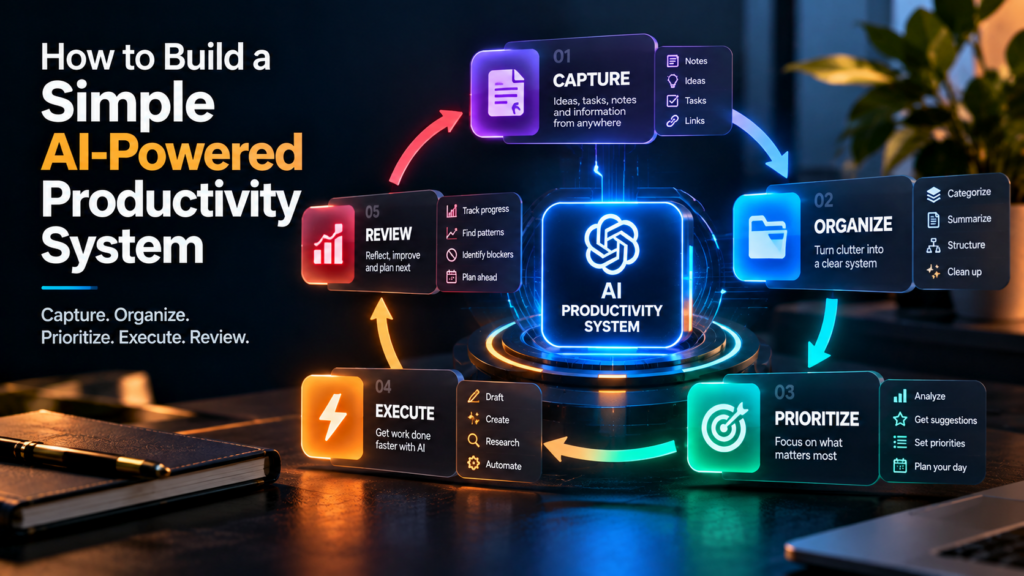
The basic system can be thought of as five stages:
Capture → Organize → Prioritize → Execute → Review
AI can support different parts of each stage.
For example:
- Capture ideas with notes or voice input
- Use AI to summarize or organize information
- Ask AI to help prioritize a long task list
- Use AI to draft, research, or structure work
- Review completed work and identify what needs attention next
The important part is that AI supports the system rather than becoming the system.
You should still know what your priorities are and what you are responsible for.
Step 1: Choose One Place to Capture Everything
The first part of a productivity system is simple: stop relying on memory.
Ideas, tasks, requests, reminders, and interesting information will appear throughout your day.
If you keep them scattered across random messages, screenshots, browser tabs, notebooks, and your memory, important things will eventually get lost.
Choose one primary place to capture them.
It could be:
- A notes app
- A task manager
- A digital workspace
- A simple document
- A notebook
- A combination of notes and calendar
The specific tool matters less than the habit.
When something important appears, put it somewhere you know you will check.
Where AI helps
AI can turn messy input into structured information.
For example, you could dump a rough collection of notes into an AI assistant and ask it to separate them into:
Tasks
- Finish article
- Reply to client
- Prepare presentation
Ideas
- New YouTube series
- Newsletter topic
- Website feature
Questions
- Which software should I use?
- When is the client deadline?
Instead of manually organizing every thought, AI can help you create structure.
Step 2: Create a Simple Task System
Once everything is captured, you need to know what actually requires action.
Do not create 25 categories.
Start with something simple.
A useful structure is:
Inbox
Things you have captured but haven’t processed yet.
Today
Tasks you intend to work on today.
This Week
Important tasks that need attention soon.
Waiting
Things that depend on another person or event.
Someday
Ideas and tasks that matter but are not currently a priority.
This simple structure is enough for many people.
The goal is not to create the world’s most sophisticated productivity dashboard.
The goal is to make it obvious what needs your attention.
Step 3: Separate Tasks From Projects
One common productivity problem is treating large projects as individual tasks.
For example:
Build a website
is not really one task.
It could involve:
- Choose a domain
- Set up hosting
- Install WordPress
- Choose a theme
- Create the homepage
- Write website copy
- Create the About page
- Configure contact forms
- Test mobile layout
- Publish
When everything appears as one giant task, it becomes harder to know where to start.
Instead, think of:
Project: Build website
and then break it into smaller actions.
Where AI helps
AI can take a large objective and help break it into smaller steps.
You could ask:
“Break this project into practical tasks that can each be completed in 30–90 minutes. Put them in a logical order and identify anything that depends on another task.”
The resulting list is a starting point, not a command.
Review it and remove anything unnecessary.
Step 4: Use AI to Plan Your Day
A task list tells you what exists.
It does not necessarily tell you what you should do first.
This is where AI can become useful as a planning assistant.
At the beginning of your workday, give AI:
- Your important tasks
- Deadlines
- Available working hours
- Meetings
- Your priorities
- Any constraints
Then ask it to help create a realistic schedule.
For example:
“I have five hours available today. I need to finish a client proposal, edit a video, reply to six emails, and write an article. The proposal is due tomorrow. Help me arrange these tasks realistically, including breaks.”
AI might suggest an order based on urgency and effort.
You then adjust the plan based on what AI cannot fully know about your energy, preferences, or changing circumstances.
Don’t Schedule Every Minute
There is a temptation to turn AI into a scheduling machine that assigns every minute of your day.
That can create a system that looks productive but is difficult to follow.
Leave room for:
- Unexpected requests
- Longer-than-expected tasks
- Breaks
- Creative thinking
- Communication
- Problems that appear during the day
A good productivity system should help you work, not make you feel like you are constantly failing your schedule.
Step 5: Give AI the Right Context
AI becomes significantly more useful when it understands what you are working with.
Compare these two prompts:
“Help me plan my week.”
and:
“I run a small content business. This week I need to publish two articles, record one YouTube video, finish a client project, respond to outstanding emails, and update my website. I have about four focused work hours each weekday. Help me prioritize these tasks and create a realistic weekly plan.”
The second request gives the AI context.
A useful AI productivity system should gradually accumulate relevant context.
That might include:
- Your recurring responsibilities
- Project goals
- Deadlines
- Preferred working hours
- Typical workflows
- Important constraints
- Standard processes
The more useful context the system has, the less time you may spend explaining the same thing repeatedly.
But be careful about what information you provide.
Do not casually upload confidential customer information, passwords, financial credentials, or sensitive business data to an AI service without understanding how that information is handled.
Step 6: Use AI for the First Draft, Not Every Final Decision
One of the most useful productivity applications for AI is getting past the blank page.
You can use it to create a first draft of:
- Emails
- Reports
- Proposals
- Meeting summaries
- Content outlines
- Presentations
- Project plans
- Checklists
- Research summaries
This can reduce the friction involved in starting.
But there is an important distinction:
First draft ≠ final answer.
AI can produce something that looks polished while still containing incorrect information, weak reasoning, or assumptions you did not intend.
Use AI to accelerate the first 60–80% of routine work, then apply your own judgment to the rest.
Step 7: Create Reusable AI Prompts
If you perform the same type of work repeatedly, don’t start from scratch every time.
Create reusable prompts.
For example, a freelancer might create templates for:
Client email
“Rewrite this message so it is clear, professional, concise, and friendly. Keep the original meaning and do not make promises that aren’t in the source text.”
Meeting summary
“Turn these meeting notes into decisions, action items, owners, deadlines, and unresolved questions. Do not invent information that isn’t present.”
Content ideas
“Generate 10 content ideas based on this topic. Prioritize practical problems beginners actually face and avoid generic topics.”
Research
“Organize these notes into key findings, supporting evidence, open questions, and areas that require verification.”
Weekly review
“Analyze this week’s completed and unfinished tasks. Identify what was completed, what remains, what appears blocked, and what should be prioritized next week.”
Reusable prompts turn AI from something you occasionally experiment with into part of a repeatable workflow.
Step 8: Build a Simple Knowledge Base
A productivity system becomes more useful when important information is easy to find.
You could maintain a simple knowledge base containing:
- Project information
- Frequently used instructions
- Brand guidelines
- Client information
- Standard operating procedures
- Research
- Useful links
- Content ideas
- Templates
- Frequently asked questions
The goal is not to document your entire life.
Document information you repeatedly need.
AI can help maintain it
Suppose you have several messy notes about a project.
You can ask AI to organize them into:
Project overview
Objectives
Current status
Open questions
Next actions
Important resources
Now you have something much easier to reference later.
Step 9: Automate the Repetitive Parts
Once your workflow is working manually, look for repetitive steps that could be automated.
For example:
New meeting → transcript → AI summary → action items → task list
Or:
New article → AI extracts key points → social post drafts → content queue
Or:
Customer enquiry → classify request → prepare response → human review → send
Notice something important about these examples.
The automation is not necessarily:
AI does everything.
It is:
AI handles specific steps inside a larger workflow.
That is usually easier to control and troubleshoot.
Step 10: Create a Weekly AI Review
One of the most useful parts of a productivity system is the review.
Once a week, look at:
- What did I complete?
- What remains unfinished?
- What am I waiting for?
- Which projects are becoming urgent?
- What tasks keep getting postponed?
- What can I eliminate?
- What could be automated?
- What should I prioritize next week?
AI can help analyze your notes and task history.
For example:
“Here is my completed and unfinished work from this week. Identify recurring bottlenecks, tasks I repeatedly postponed, and three areas I should focus on next week.”
The AI can help you see patterns.
You decide what those patterns actually mean.
A Simple AI Productivity Stack
You don’t need a huge collection of applications.
A basic system could contain just a few components:
1. Capture tool
Where you record ideas, tasks, and information.
2. Task manager
Where actionable work lives.
3. Calendar
Where time-specific commitments live.
4. AI assistant
Where you get help with planning, writing, summarizing, research, and problem-solving.
5. Knowledge base
Where important reference information is stored.
These could be separate tools or combined into fewer applications.
The objective is to create one connected workflow, not to collect software.
What Your Daily Workflow Could Look Like
Here’s an example of how everything can fit together.
Morning
Check your calendar and task list.
Give AI your available time and today’s priorities.
Ask it to help you create a realistic plan.
During the day
Capture new tasks and ideas in your system.
Use AI when you need help with:
- Research
- Writing
- Summarizing
- Brainstorming
- Structuring information
- Breaking down complex work
Complete the actual work yourself.
End of day
Review what you completed.
Move unfinished tasks to the appropriate place.
Capture anything that needs attention tomorrow.
End of week
Review your projects and task list.
Use AI to identify patterns, bottlenecks, and recurring tasks.
Decide what should change next week.
This creates a simple cycle:
Plan → Work → Capture → Review → Improve
Don’t Let AI Become Another Distraction
There is an irony to AI productivity.
You can spend an entire afternoon testing productivity prompts, comparing AI applications, building elaborate dashboards, and watching videos about productivity systems without actually doing the work.
That is not productivity.
If your system requires more maintenance than the work itself, simplify it.
You should be able to explain your productivity system in a few sentences.
For example:
“I capture everything in one place, keep actionable tasks in my task manager, put appointments on my calendar, use AI to help plan and process information, and review everything once a week.”
That’s enough.
Where Human Judgment Still Matters
AI can help you process information quickly, but productivity is not simply about processing more information.
You still need to decide:
- What matters
- What does not matter
- What should be postponed
- What should be eliminated
- Which opportunity is worth pursuing
- Which project deserves your attention
- When to say no
AI can help you make these decisions more systematically, but it should not become the authority over your priorities.
Your productivity system should serve your goals.
Not the other way around.
Start Small
You don’t need to build the complete system today.
Start with three things:
1. One place to capture tasks and ideas.
2. One task list containing your actual priorities.
3. One AI assistant that helps you plan, write, summarize, and organize.
Use that system for a couple of weeks.
Notice where you still waste time.
Then improve it.
Maybe you discover that meeting summaries take too long. Automate that.
Maybe you spend too much time writing repetitive emails. Create a reusable prompt.
Maybe you constantly forget follow-ups. Connect your task system and calendar more effectively.
Build the system around your actual problems, not around what productivity influencers say you should be using.
Final Thoughts
An AI-powered productivity system does not need to be complicated.
At its simplest, it is a normal productivity workflow with AI helping you reduce repetitive work, process information, plan tasks, and get started faster.
The most important part is not the AI.
It is the system underneath it.
Capture your work.
Organize it.
Prioritize what matters.
Use AI where it saves time.
Keep human judgment where it matters.
Review the system regularly.
Then improve it as your work changes.
The best productivity system is not the one with the most automation.
It is the one that helps you consistently do the work that actually matters.